iOS13から導入されたダークモードですが、デザインの都合上ダークモードにしたくないアプリもありますよね。特に何も考えずに実装していると勝手に背景が黒くなったり文字が白くなったりします。
そういった場合はダークモードを無効化することでデザインが変わらないようにする必要があります。
ダークモードを無効にする方法
info.plistに「Appearance」を追加して「Light」と設定するだけです。
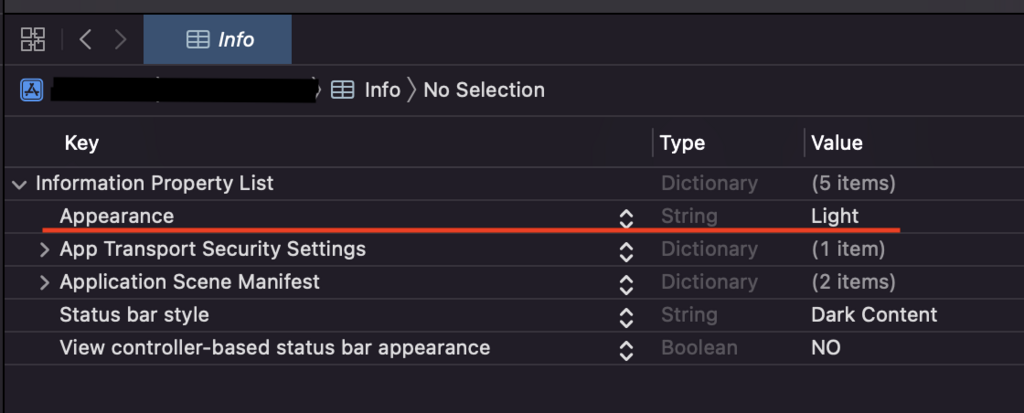
ちなみにダーク状態にしたい場合は「Dark」を指定すればOKです。
 Swift
SwiftiOS13から導入されたダークモードですが、デザインの都合上ダークモードにしたくないアプリもありますよね。特に何も考えずに実装していると勝手に背景が黒くなったり文字が白くなったりします。
そういった場合はダークモードを無効化することでデザインが変わらないようにする必要があります。
info.plistに「Appearance」を追加して「Light」と設定するだけです。
ちなみにダーク状態にしたい場合は「Dark」を指定すればOKです。


コメント